Reelium vs OpusClip for Twitch VODs
OpusClip is good at what it is built for — podcasts, interviews, talking-head footage you already have as a file. If that is your source material, keep using it. This page is about one specific thing it does not do: start from a Twitch link.
Inspect the actual Reelium clip picker
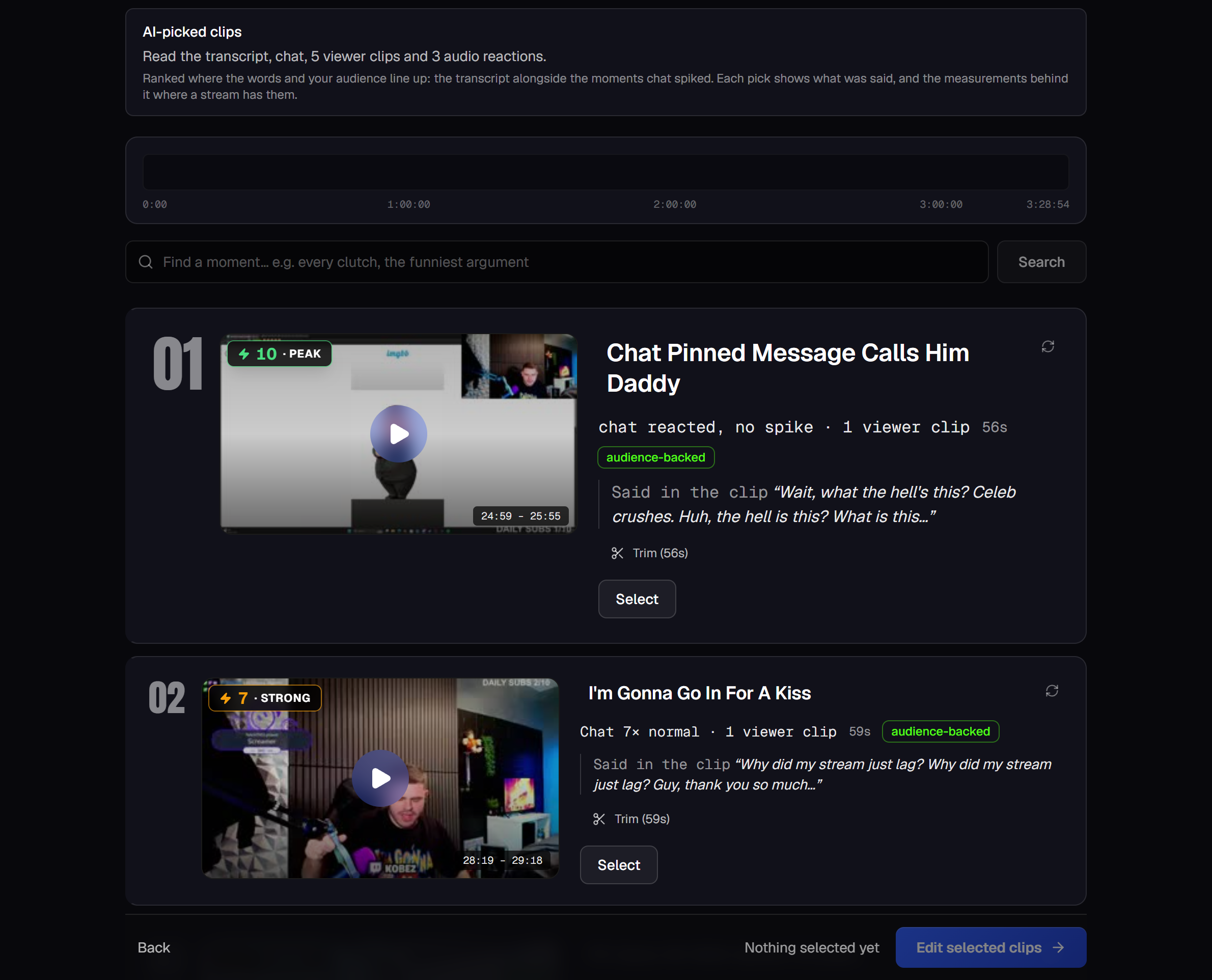
What each one imports
OpusClip
Their pricing table lists video import sources as local video (up to 10GB), YouTube, Google Drive, Vimeo, Zoom, Rumble and StreamYard. Twitch and Kick are not on that list. Auto import is described as “from verified YouTube account”.
Reelium
A Twitch or Kick link to one past broadcast or clip. Or a Twitch channel link — paste twitch.tv/yourname and Reelium lists your recent broadcasts for you to pick from. Paid plans also take an MP4, MOV or MKV upload.
What happens when you paste a Twitch link
We checked, rather than assumed. Pasting a link to a Twitch past broadcast into the “Video link” field on OpusClip's homepage returns “Invalid URL”. So does a Twitch channel link. On Reelium the first is accepted, and the second lists your recent broadcasts.
You can of course download a VOD and upload the file instead — that is a real workaround, and for a 6-hour stream it is also a large download, an upload and a wait before anything starts.
Minutes, or streams
The units differ, and for long VODs the unit is the whole argument. OpusClip meters processing minutes; Reelium counts stream hours, and every clip the picker finds inside an analysed VOD is included. Each plan's hours are on the pricing page.
What Reelium does not do
- No AI b-roll. OpusClip ships it; Reelium does not. On a long VOD the hard part is picking the right thirty seconds, but if you want b-roll, that is a real difference.
- No XML export to Premiere or DaVinci.
- No YouTube source links yet. Twitch and Kick today; paid plans take an MP4, MOV or MKV upload.
Frequently asked
- Can OpusClip clip a Twitch VOD?
- Not from a Twitch link. OpusClip's own pricing table lists its video import sources as local video, YouTube, Google Drive, Vimeo, Zoom, Rumble and StreamYard. Pasting a twitch.tv link into the field on their homepage returns "Invalid URL". Checked 6 September 2026. You can still download the VOD yourself and upload the file.
- What does Reelium take?
- A Twitch or Kick link to one past broadcast or clip, or a Twitch channel link — paste twitch.tv/yourname and Reelium lists your recent broadcasts so you can pick one. Paid plans also take an MP4, MOV or MKV upload.
- Is OpusClip a bad tool?
- No. It is strong on podcast and talking-head footage, and it ships things Reelium does not — AI b-roll and an XML export to Premiere and DaVinci. If that is your source material, it is a reasonable choice.
- What does Reelium cost?
- The free tier covers 1 hour of stream analysed every week, with no card. No watermark on your clip. Free downloads end with a 1-second Reelium card. Reelium counts stream hours rather than processing minutes, which is the unit a streamer already thinks in.
Paste a Twitch VOD link, or just your channel name, and see what Reelium finds in it. Clips export to TikTok, YouTube Shorts and Instagram Reels.
Find my clips freeOpusClip import sources, plan names and the behaviour of the link field on their homepage checked 6 September 2026. OpusClip is a trademark of its owner; this page is not affiliated with or endorsed by them.